MerchantAI supports multiple AI providers. You supply the provider API key; MerchantAI supplies the agent execution environment and integrations.
Configure a provider
- From the main Agents page, Launch an agent.
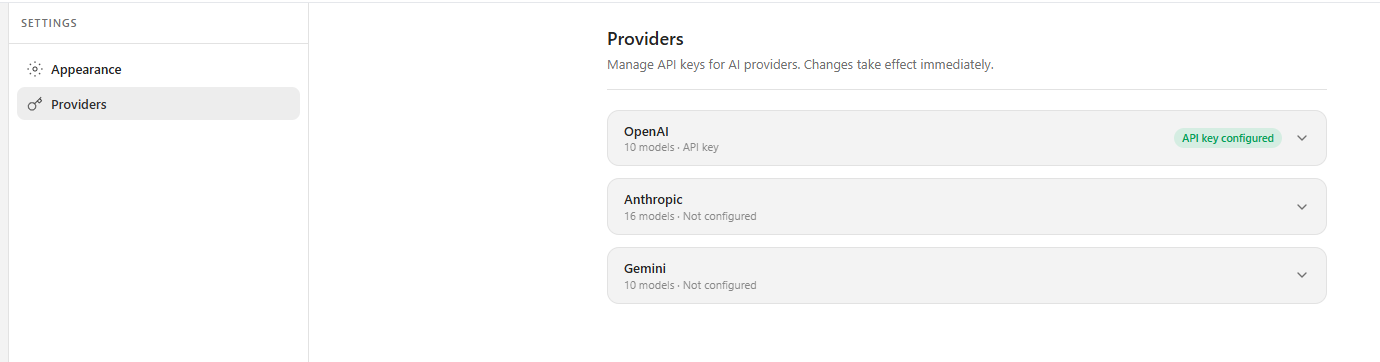
- Open the gear-shaped Settings section in its workspace.
- Select Providers.
- Expand the provider you want to use: OpenAI, Anthropic, or Gemini.
- Enter the provider credentials requested by the interface and save the setting.
- Check the status displayed for the provider. A successfully saved key may appear as API key configured.
Provider keys come from the provider's own developer or API platform. A regular chat subscription is not necessarily the same as an API account.
Choose a model in Chat
- Open Chat.
- Use the model selector beside the message composer to choose an available model.
- Where supported, adjust the reasoning-effort setting.
- Send your request.
Model availability and usage costs depend on the provider and your provider account.
If the model is unavailable
Check that the selected provider is configured, the API key is valid, and your provider account permits API usage. Then retry or choose another configured model.
Billing: AI model usage is billed separately by the model provider. MerchantAI's subscription covers the application, not prepaid AI tokens.
Related articles
Was this article helpful?
That’s Great!
Thank you for your feedback
Sorry! We couldn't be helpful
Thank you for your feedback
Feedback sent
We appreciate your effort and will try to fix the article